✨ TL;DR (Overview)
A moodboard for branding is a visual tool you can use to define the look, feel, and personality of your business before you design your website, logo, or content. Learning how to make a moodboard helps you stop guessing and start creating content that’s visually aligned across all of your platforms!
In this guide, you’ll learn:
- What a moodboard really is in branding
- Why a moodboard for small business owners is a strategic step
- Exactly what to include on a moodboard
- A beginner-friendly moodboard creation process
- Tools, tips, and branding moodboard examples
Branding is so important! It’s the first thing I need from my clients before designing their websites so it feels aligned with their business! Learn more about my website design services here!
Download Your FREE Cheat Sheet
The Plug-and-Play Blog Writing Prompts That Took My Traffic from 3K to 50K Impressions
This free cheat sheet will help grow your reach and visibility faster with AI prompts that will help you write each blog post faster and optimize it for SEO (Search Engine Optimization – think Google) and AEO (Answer Engine Optimization – think AI Search).
What Is a Moodboard in Branding?
A moodboard for branding is a curated collection of visuals, including: colors, typography styles, imagery, textures, and design inspiration. It represents how your brand should look and feel. It’s often called a visual branding moodboard because it acts as a visual guide for your brand identity before design decisions are created and finalized.
Think of it this way, if your brand had a visual compass – your moodboard would be it! Instead of choosing things randomly every time you create your content, a moodboard for brand identity helps you create consistent visuals with the same patterns and styles. It helps to remove the decision of what your content should look like on a day to day basis. You always have a starting point, the only thing that changes is the content, not the visual identity.
Before I had a moodboard for my own business, my content didn’t always feel like it belonged together. Some days I would want to show up with bold colors and other days I wanted it to be more muted. My moodboard for branding allowed me to really figure out how I wanted my business to be seen by others, how I wanted them to feel and how to consistently show up in that way!
And a bonus, my brand became recognizable across all platforms! Which is exactly what you want!
Want to read about my rebrand process? I wrote about it here: How I Launched My Business Rebrand to Align With My Personality
Why a Moodboard for Small Business Owners Matters
A moodboard for small business owners isn’t just a creative exercise; it’s a decision-making tool.
Like I shared earlier, when you don’t have a visual direction it’s really easy to get lost in trying to create content that looks visually appealing. You can struggle with colours and fonts all day long before you actually create something! It wastes a lot of time but it also does your business a huge disservice by not building brand recognition.
I say this because I have been there! Before I invested in branding I felt like I was all over the place! Every design choice felt heavy. I would open Canva and stare at fonts, save 200 Pinterest images that don’t match just for inspiration. I would get inspired by other peoples brands and try similar colours for my own (which changed all the time). This constant switching slowed down content creation and made my brand feel inconsistent.
A visual branding moodboard changed that. It became my reference point when I created anything for my business. And the best part, it saved me so much time because I wasn’t wasting time deciding how I wanted it to look!
A moodboard helps you:
- Create visual consistency – Your brand moodboard color palette ideas guide your website, graphics, and marketing.
- Speed up content creation – With a moodboard for brand identity, you’re not reinventing your style every time.
- Communicate your vision clearly – A moodboard for branding shows designers, photographers, and collaborators what you mean visually so you’re not repeating what you want your brand to feel like every time you work with someone.
- Build a more recognizable brand – Repeated visual elements help people remember you.
- Avoid costly design re-dos – Clarity early in the moodboard creation process prevents rebranding later.
I’ll say this… Before I started being consistent with my branding across all platforms, sometimes I didn’t even recognize my content! I don’t even know if I should admit that but I did! My Pinterest just looked like a mish mash of colours and fonts and brand feelings. But now, I can spot my content from a mile away. Which tells me, my audience will also be able to do the same!
Think of Jenna Kutcher, she’s one person where if I see content I immediately know it’s hers. Build your brand like Jenna Kutcher!
What to Include on a Moodboard
If you’re wondering what to include on a moodboard, think beyond “pretty photos.” You’re creating a visual system!
A strong moodboard for branding blends emotional direction with practical design elements.
One thing I was so particular about for my branding was the feeling I wanted it to give anyone who interacted with it. I want my audience to feel like they just sat down with a hot cup of coffee or tea and cozied up with a blanket. That was literally what I told my brand designer (Pascale Berkowitz, she’s incredible) instead of saying “I want this color or this type of font”.
Here are some examples of Mood Boards!
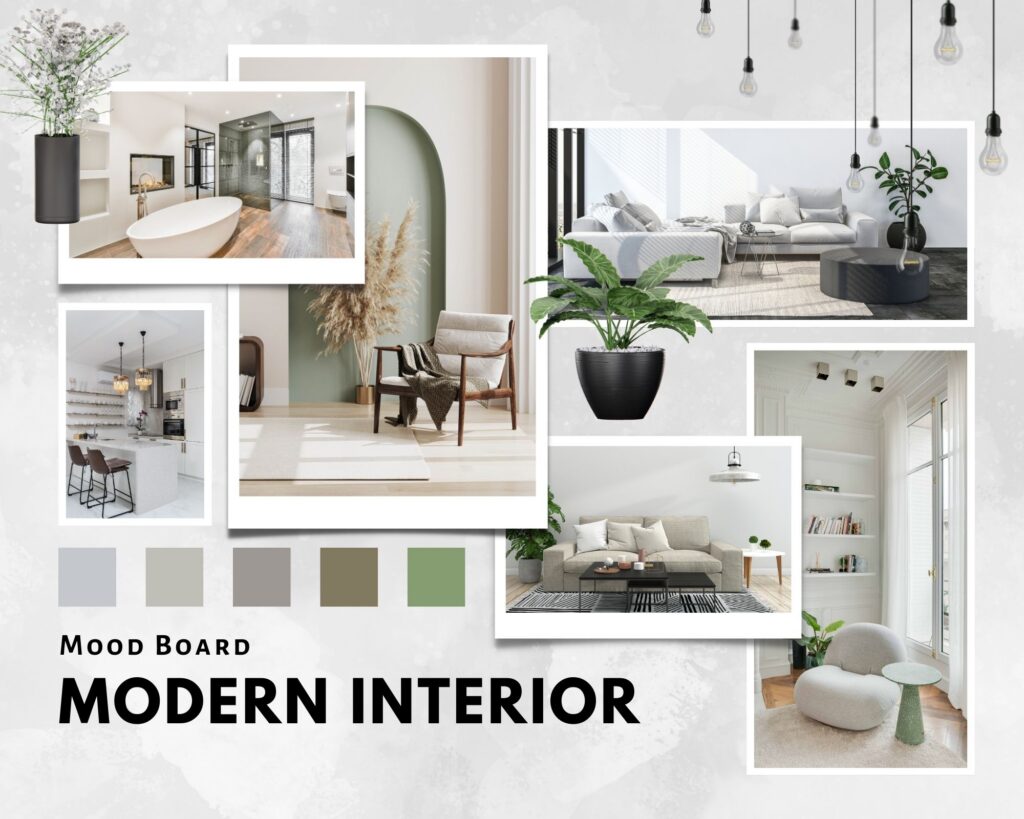

Core elements you need for your Moodboard:
- Brand moodboard color palette ideas – Main colors + supporting neutrals or accents.
- Typography – Choose a font you want for your Title and Headers and a font for your paragraph text. Additionally you can add an accent font for visual appeal!
- Imagery – Choose images that share the feeling you want your brand to exude. For example, bright vs moody, polished vs candid, minimal vs layered.
- Textures & design details – These can add to the feeling of your brand. Think: film grain, linen textures, paper overlays, shadows, etc.
- Brand feeling words – Words that guide your visuals (calm, bold, soft, grounded).
- Website & layout inspiration – This is huge for me, your website can be an experience for your visitors, what do you want that experience to feel like?
How to Make a Moodboard (Step-by-Step)
Ok my friend, do not feel overwhelmed by this and don’t think you have to hire a professional Designer to create your Moodboard. If you are just starting out I do recommend that you start by creating your own because your brand will evolve over time. And when you have a clear direction and message that’s when you should hire someone to bring your brand to life!
For now, grab a warm drink and cozy up to create your Moodboard! This is a super exciting step in sharing your business with your ideal customers!
Here’s a beginner-friendly moodboard tutorial for beginners that keeps things simple.
1. Define the Feeling First
Write 3–5 words describing your brand. This anchors your moodboard creation process. If you’re not sure about a decision while working through the rest of the steps you can come back to these words and see if it’s in alignment!
2. Gather Moodboard Inspiration Ideas
Search for moodboard inspiration ideas on Pinterest, blogs, or stock image sites. Don’t overthink this part! Collect first, refine later. It’s always better to pin more and then remove afterwards, this allows you to see which images are similar and what you gravitate towards.
3. Notice Patterns
Look at what you saved. Are the images soft? Neutral? Bold? This helps shape your brand moodboard color palette ideas. For example, when I created my own branding when I started my business, I saw a pattern of soft colors so that’s what I went with for my Moodboard!
4. Choose Typography
Choose what fonts you want to consistently use throughout your content. I recommend choosing three fonts: 1 for your title and headings, 1 for your paragraph text and then 1 accent font for design and personality!
5. Build a Digital Moodboard
This is where how to build a digital moodboard becomes practical. You’re taking all your inspiration and turning it into one clear visual direction.
Start by signing up to these platforms so you can use them to create your Moodboard:
- Canva – they have great easy to use templates!
- Pinterest – perfect to start saving images and get inspiration
Then:
Save all of your content in one area – Keep everything in one place so you can see how elements look together and if they complement each other. You can download these into one folder or pin them all on one board on Pinterest
Create your mood board on Canva:
Canva has so many templates for you to choose from! Be sure to choose one that includes all of these sections:
- Color palette
- Typography examples
- Imagery style
- Textures or design details
Focus on harmony, not perfection – You’re not designing a final graphic. You’re checking: Do these elements feel like they belong in the same world? That’s your goal when you start creating your moodboard for branding.
Remove what doesn’t match – If something stands out in a distracting way, it probably doesn’t align with your visual direction.
By the end, your board should clearly show the feeling of your brand at a glance; that’s when your moodboard creation process has done its job.
Branding Moodboard Examples
Seeing branding moodboard examples helps you understand how different styles translate visually.
Below are some super simple mood boards I created for my Showit Website templates. Even though they just have the basics, you can see how the color, imagery, and typography work together to create a cohesive identity and a specific feel.


FAQ: Moodboards & Branding
What is a moodboard in branding?
A moodboard for branding is a visual guide made of colors, images, and styles that define how a brand should look and feel.
Why is a moodboard important for branding?
A moodboard for brand identity creates clarity and keeps your visuals consistent.
What tools can I use to create a moodboard?
Popular digital moodboard tools include Canva, Pinterest, and Figma.
Can I make a moodboard in Canva?
Yes, Canva is one of the easiest ways to learn how to build a digital moodboard.
TL;DR Recap
A moodboard for branding gives you visual direction before you start designing or creating content! Learning how to make a moodboard helps you create a cohesive brand with colors, imagery, and feeling that make your brand look intentional, professional, and recognizable.
With a solid visual branding moodboard, you:
- Make design decisions faster
- Keep your colors, fonts, and imagery consistent
- Communicate your vision more clearly to designers or collaborators
- Create a brand presence that feels aligned, intentional, and recognizable
When your visuals feel clear, your brand feels clearer too and that confidence shows in everything you create.
You’ll also love…
Personal Branding for Solopreneurs: A Simple 5 Step System That Grows With You
How to Grow an Online Business Without Becoming a Social Media Influencer
Blogging Mistakes for Beginners: What to Avoid With Your Blog and Pinterest
How to Blog Consistently Without Stress: The Cozy Creator’s Guide
10 Best Google Font Pairings Designers Love (And How to Choose Font Pairs for Your Website)
Liked this post? Pin it to Pinterest! 👇